ChatGPT setup guide
Make phone calls from ChatGPT with the official ClawCall plugin
Yes—ChatGPT can make phone calls with the official ClawCall plugin for ChatGPT, listed in ChatGPT’s plugin directory. Select Plugins in ChatGPT, search “ClawCall”, select Install plugin, and allow the connection. ChatGPT can then place English-language calls to US +1 numbers and report the transcript evidence actually captured. You don’t need Developer mode, and you never paste an API key.
- Setup surface
- ChatGPT plugin directory
- Transport
- Streamable HTTP
- Authentication
- OAuth with discovery and DCR
Before you start
https://api.clawcall.dev/mcp manually through Developer mode.- A ChatGPT account with Plugins. Business, Enterprise, and Edu workspace admins may control which plugins members can install.
- A ClawCall account, or create one when the consent page asks you to sign in. New accounts verify a phone number before allowing the connection.
- A real US +1 destination for an English-language call, in E.164 format, for any call you choose to place.
- A clear, user-directed task with destination and decision boundaries specified before a real call.
Connect ChatGPT to ClawCall
Search for ClawCall in ChatGPT’s plugin directory
In ChatGPT, select Plugins in the sidebar and search for “ClawCall”. Open the result that reads “ClawCall: Make and manage phone calls”. The Install plugin button is on that listing.
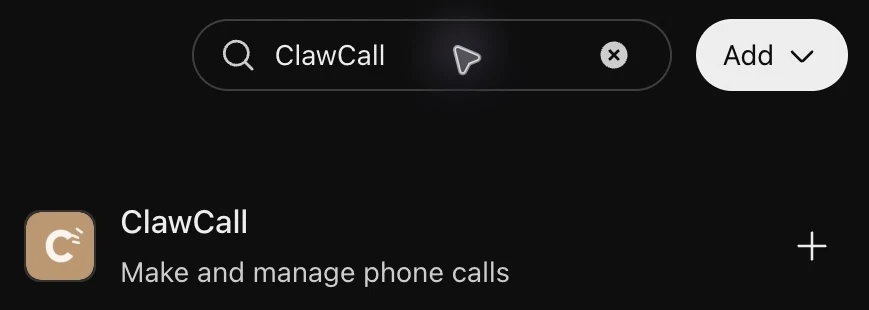
Search Plugins for ClawCall. Open the listing and select Install plugin
The ClawCall listing shows the tagline “Make and manage phone calls”, suggested prompts such as “What is my current account status?”, and a description of what ClawCall does. Select Install plugin.
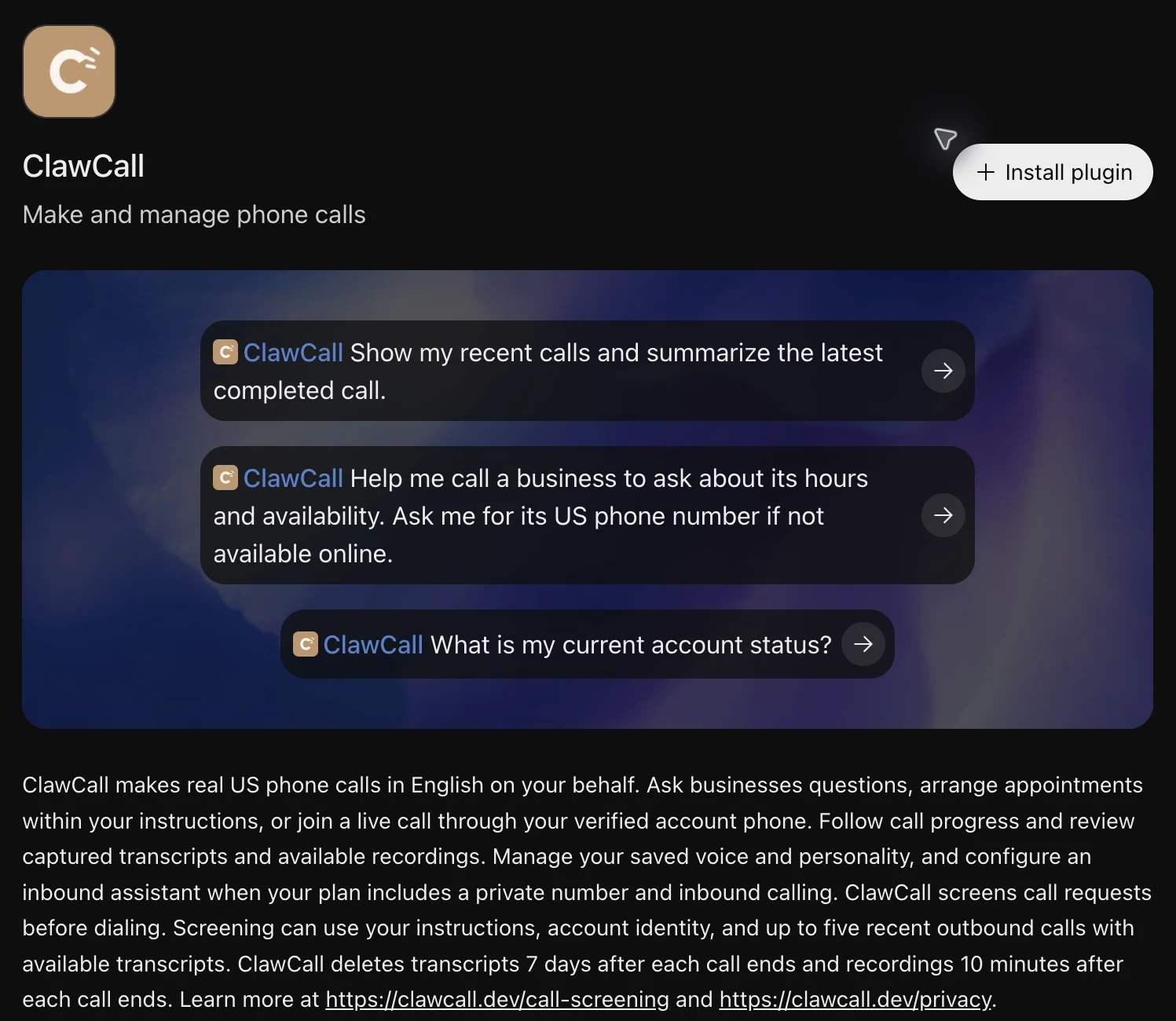
Select Install plugin on the ClawCall listing. Allow the connection
ClawCall’s consent page opens, titled “ChatGPT wants to use ClawCall”. Sign in to ClawCall first if asked, using the account whose plan and call history ChatGPT should use. A new account verifies a phone number first.
Check that the Recognized AI host box names
https://chatgpt.com, review the read and call permissions (thecalls:readandcalls:writescopes), and select Allow connection. ChatGPT receives revocable OAuth tokens, never your ClawCall API key. Back in ChatGPT, the listing shows Try in chat.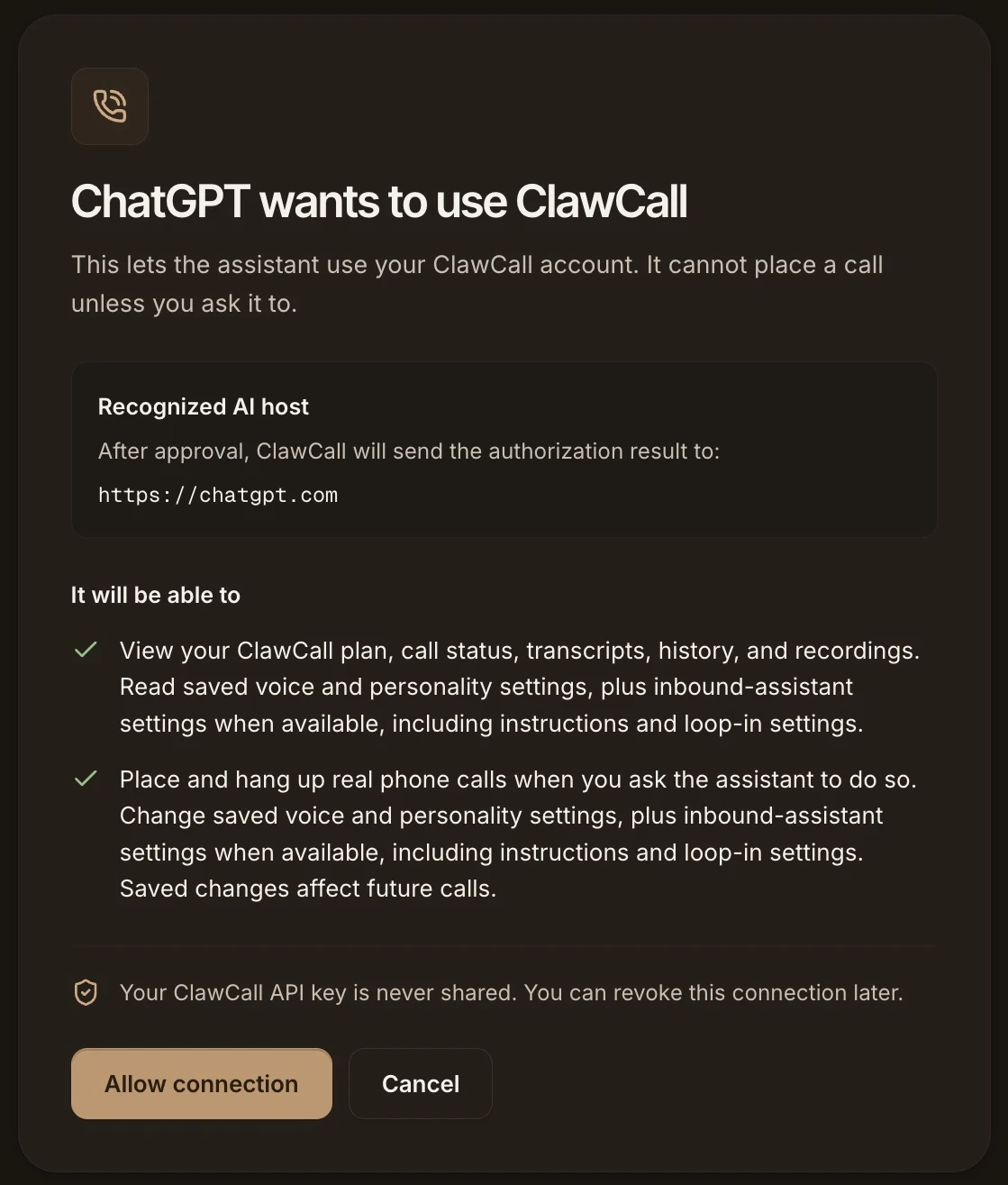
Check that the host is https://chatgpt.com, then select Allow connection. Allow all tools
If you want ChatGPT to run the whole calling workflow without approving each tool, select the more button beside Try in chat on the ClawCall listing, then Manage. Open Permissions and choose Allow all tools.
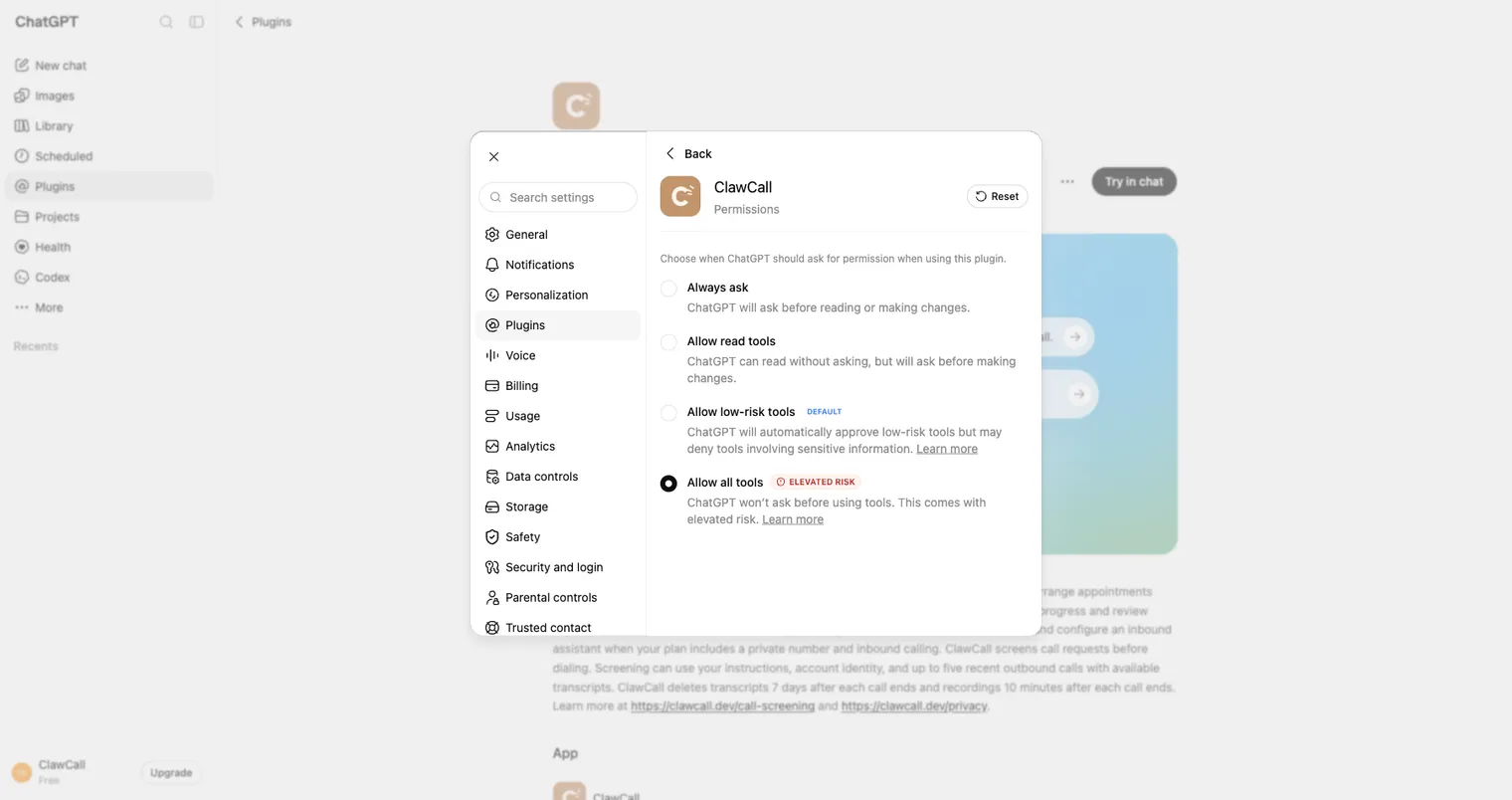
Choose Allow all tools. Run the read-only check
Select Try in chat, or start a new chat and type
@ClawCall. Ask it to check your plan without placing a call, or use the listing’s suggested prompt “What is my current account status?”. ChatGPT reads your ClawCall account and dials no one.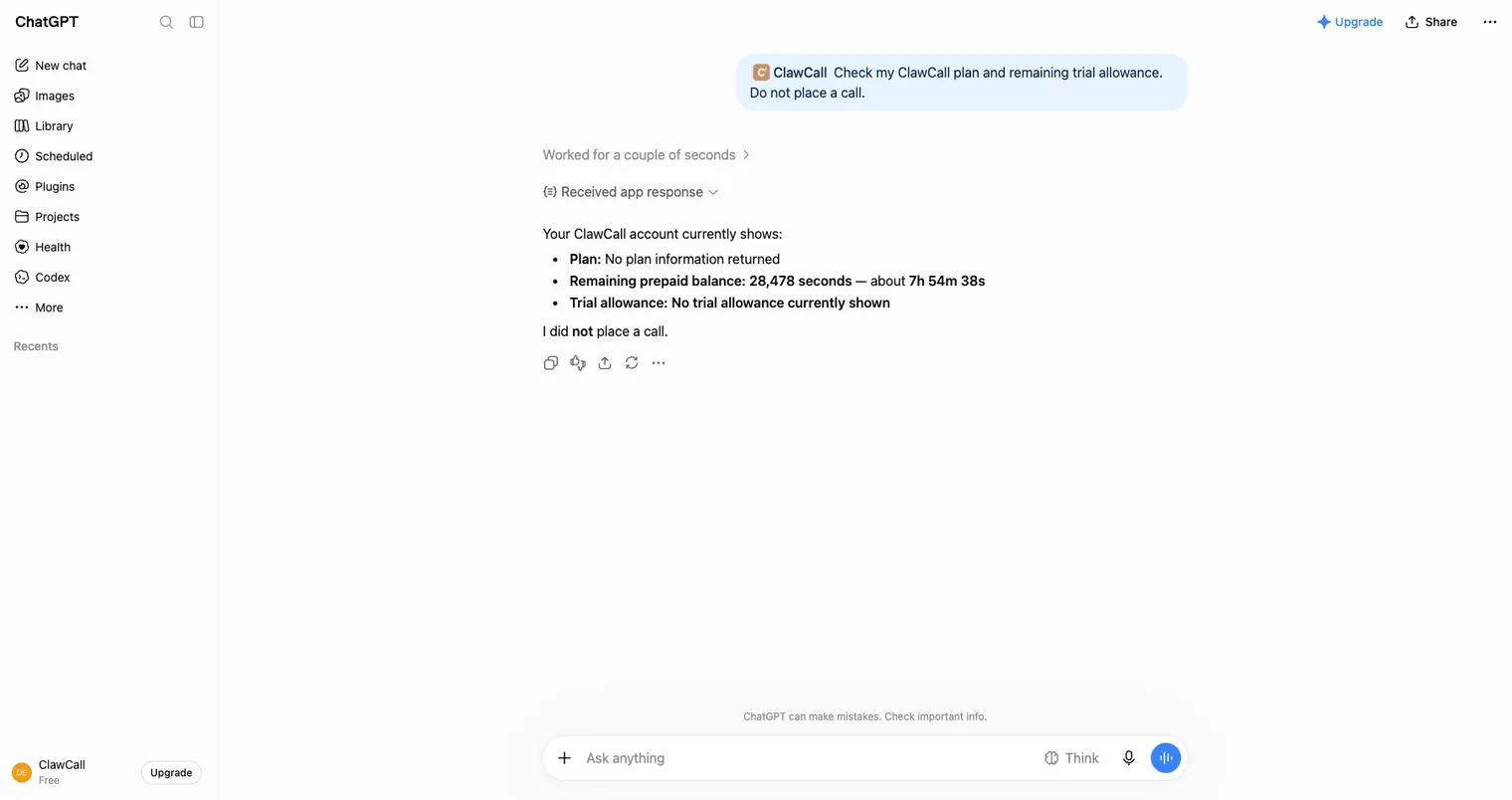
The read-only check confirms the connection without placing a call.
OAuth scopes and host permissions
ChatGPT signs in with OAuth and asks for two scopes: calls:read to read account and call state, and calls:write to place or hang up calls and change call settings. It gets revocable tokens, never your ClawCall API key.
Recommended: Allow all tools
If you want ChatGPT to run the complete calling workflow, from placing the call to checking its status, without asking you to approve each of the eleven tools, open the ClawCall listing, select the more button, then Manage → Permissions, and choose Allow all tools. ChatGPT labels this setting elevated risk; with it on, ChatGPT won’t ask before placing a real call.
Allow all tools only skips the repeated approval prompts. It does not widen the two OAuth scopes, override workspace policy, or allow bulk or automated calling.
Verify read-only, then place one controlled call
Check account state first. Only after that succeeds, place the first real call to a number you control.
Check my ClawCall plan and remaining trial allowance. Do not place a call.
Using ClawCall, call my phone at +1XXXXXXXXXX. Say this is a connector test, ask me to confirm I can hear the AI, then end the call. Show me any transcript evidence actually captured afterward.
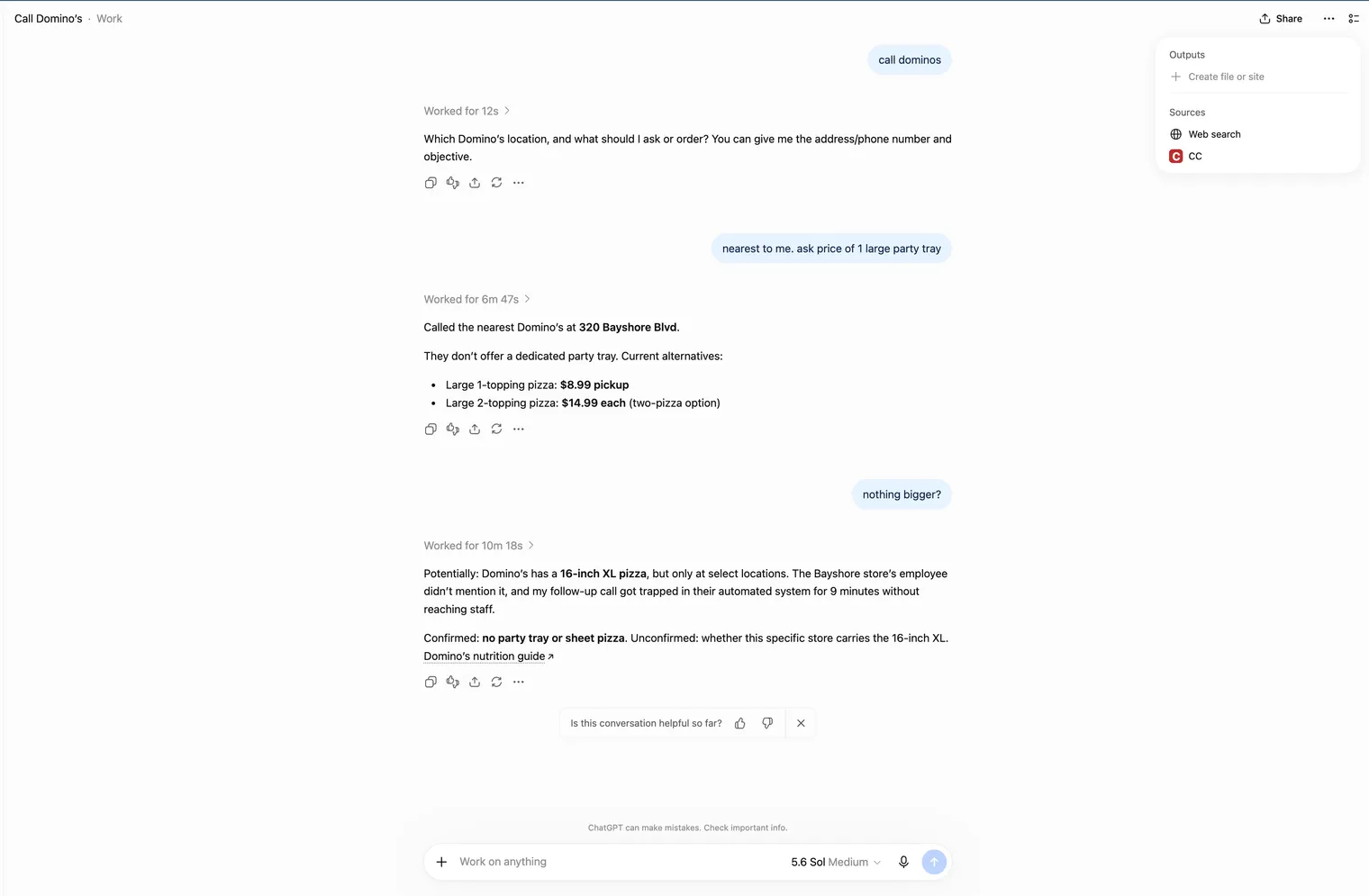
Real ChatGPT example: automatic selection for a price inquiry
A normal request asked ChatGPT to find a nearby Domino’s and call it. ChatGPT combined web search with ClawCall on its own and returned the large-pizza prices it heard. It asked about prices only; nothing was ordered.
Tools and troubleshooting
ClawCall gives ChatGPT 11 tools: read tools for the calling guide, your plan, settings, calls, transcripts, and recordings, and write tools that place, wait on, or hang up a call and update settings. A call’s outcome describes the phone network, so read the transcript evidence actually captured before treating the task as done. The remote MCP reference lists every tool and scope.
If ChatGPT can’t find ClawCall, check that the plugin page shows Try in chat, then start a new chat. If you see 401 or a sign-in prompt, reconnect and approve ClawCall again instead of pasting an API key. For anything else, see troubleshooting in the docs.
Disconnect and revoke access
- Disconnect or remove ClawCall in ChatGPT.
- Open ClawCall Dashboard → Settings → Connected AI assistants → Disconnect to revoke its OAuth tokens.
FAQ
- Can ChatGPT make phone calls without a plugin?
- Not as far as OpenAI’s help pages describe. OpenAI’s own phone feature works the other way: you call 1-800-ChatGPT (1-800-242-8478) from a US or Canadian number to talk with ChatGPT, with 30 free minutes a month. Its help article describes calls you make to ChatGPT, not calls ChatGPT makes for you. To make calls from ChatGPT, install the ClawCall plugin from ChatGPT’s plugin directory and allow the connection; ChatGPT can then call US +1 businesses in English and report the transcript evidence actually captured. Source: OpenAI Help Center: 1-800-ChatGPT, calling and messaging ChatGPT with your phone, checked . Source: ChatGPT plugin directory: ClawCall, checked .
- Is there a ChatGPT phone call plugin?
- Yes. ClawCall publishes its own official plugin for ChatGPT, listed in ChatGPT’s plugin directory as “ClawCall: Make and manage phone calls” in the Productivity category. ClawCall, not OpenAI, builds and runs it. In ChatGPT, select Plugins, search “ClawCall”, and select Install plugin. Source: ChatGPT plugin directory: ClawCall, checked .
- How do I get ChatGPT to call a business for me?
- Install the ClawCall plugin from ChatGPT’s plugin directory, then ask in plain words, for example with the listing’s suggested prompt: “Help me call a business to ask about its hours and availability.” ChatGPT finds the business’s US number or asks you for it, places the call through ClawCall, and reports what the business said from the transcript evidence actually captured. ClawCall calls US +1 numbers in English. Source: ChatGPT plugin directory: ClawCall, checked .
- Do I need Developer mode to use ClawCall in ChatGPT?
- No. You install ClawCall from ChatGPT’s plugin directory, so there is no Developer mode to turn on, no server URL to paste, and no OAuth client to configure. You select Install plugin, then Allow connection. ChatGPT gets revocable OAuth tokens for the
calls:readandcalls:writescopes and never receives an API key. Source: ChatGPT plugin directory: ClawCall, checked . - I added ClawCall with Developer mode before. Should I switch?
- Yes. Install ClawCall from ChatGPT’s plugin directory, then remove the ClawCall plugin you added in Developer mode so only one appears. In ClawCall Dashboard → Settings → Connected AI assistants, both connections show as ChatGPT; disconnect the one with the earlier connected date. You can turn Developer mode off if nothing else needs it.
- Is ClawCall free in ChatGPT?
- Installing the plugin is free. Calls use your ClawCall account: new accounts get a trial of 30 calls and 30 minutes, whichever lasts later. After that, ClawCall plans cost $4.99, $8.99, or $14.99 a month. Your ChatGPT plan is billed separately by OpenAI. Source: ClawCall pricing, checked .
- Can my OpenAI dot make phone calls too?
- Yes, if your ChatGPT plan includes dots. Dots use the plugins connected to your ChatGPT account, so once ClawCall is installed your dot can call a US business and report back. The OpenAI dots guide covers the dot-specific steps.
- Can I install ClawCall in a ChatGPT Business or Enterprise workspace?
- If your workspace allows it. Business, Enterprise, and Edu workspace admins may control which plugins members can install. If ClawCall doesn’t appear in Plugins or won’t install, ask your workspace admin.
- Do I need to choose ClawCall before every request?
- No. Once the connection is enabled, the agent can pick ClawCall automatically when an ordinary request needs a phone call. Naming the tool is optional and mainly useful for troubleshooting.
- What does it cost?
- The ClawCall trial includes 30 calls and 30 minutes, whichever lasts later. After that, a paid plan covers ongoing calls. The host itself may need its own plan for plugins or connectors.
- Does a successful network outcome prove the task succeeded?
- No. A network outcome describes the call path. Read the transcript evidence actually captured before claiming a reservation, cancellation, price, or other real-world task was completed.
- How do I revoke access?
- Remove or disconnect ClawCall in the host, then open ClawCall Dashboard → Settings → Connected AI assistants → Disconnect to revoke that connection’s tokens.
- How long does ClawCall keep transcripts and recordings?
- ClawCall deletes transcripts 7 days after a call ends and recordings 10 minutes after a call ends. Recording URLs are temporary and cannot be renewed after they expire.
Sources
Setup steps come from ChatGPT’s own documentation and ClawCall’s product documentation, checked on the dates below.
- ChatGPT plugin directory: ClawCall
- ChatGPT: Plugins in ChatGPT
- ChatGPT Learn: Plugins
- OpenAI: Scaling AI for everyone
- OpenAI Help Center: 1-800-ChatGPT, calling and messaging ChatGPT with your phone
- ClawCall: Hosted MCP for AI agents
- ClawCall pricing
- ClawCall security
Related pages
Give ChatGPT a phone line
Install the ClawCall plugin and start with the read-only check. The trial includes 30 calls and 30 minutes, whichever lasts later.