ClawCall is an AI phone caller: it dials US businesses, works through phone menus, waits on hold, talks to whoever answers, and reports back. As of October 5, 2026, the official ClawCall plugin for ChatGPT is listed in ChatGPT’s plugin directory. To make phone calls from ChatGPT, select Plugins in ChatGPT’s sidebar, search “ClawCall”, open the listing, select Install plugin, then sign in if asked and select Allow connection. There is no Developer mode, endpoint URL, or API key to set up, and if your ChatGPT plan includes dots (Pro, Business Premium, or Enterprise), your dot can use the same plugin.
How do you install the ClawCall plugin in ChatGPT?
The whole install takes six steps:
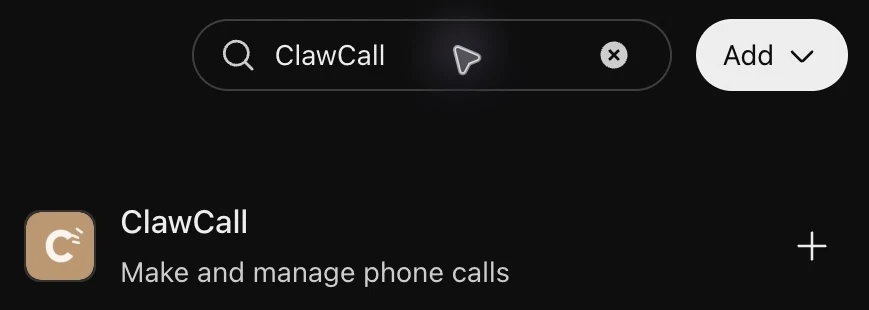
In ChatGPT, select Plugins in the sidebar.
Search “ClawCall”.
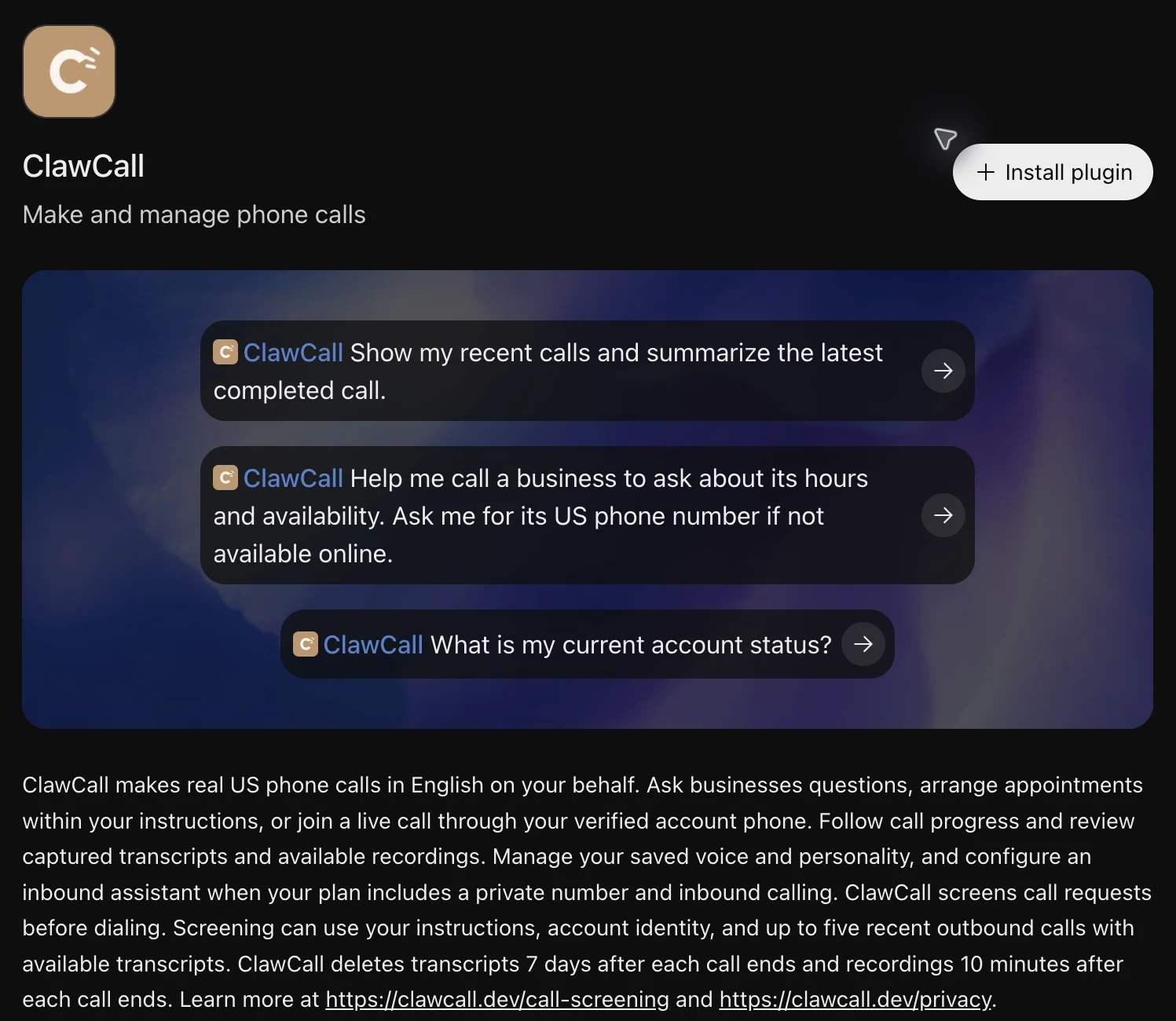
Open the ClawCall listing.
Select Install plugin.
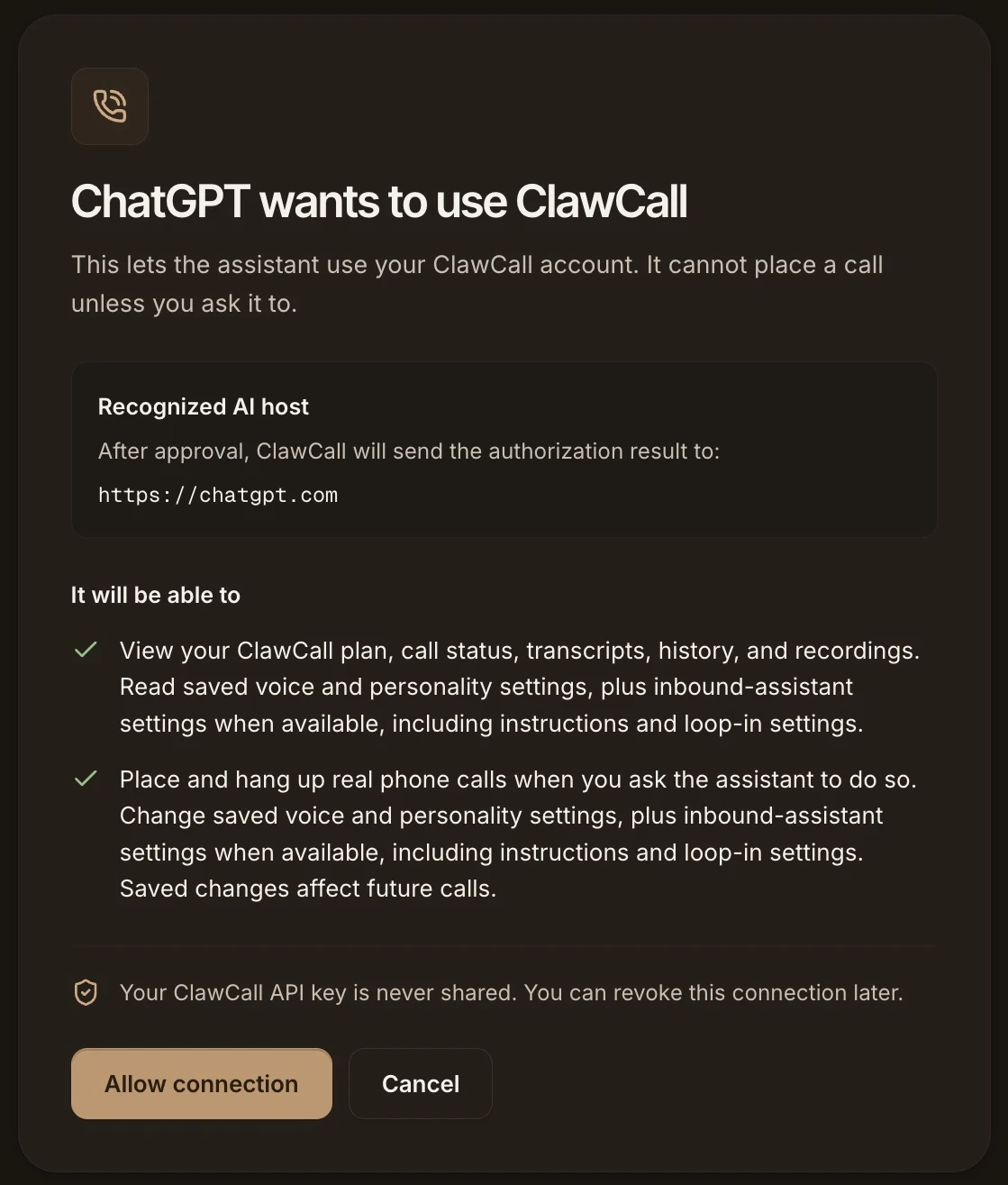
ClawCall’s consent page opens, titled “ChatGPT wants to use ClawCall”.
Sign in if asked, then select Allow connection.
Steps 1 and 2: search ChatGPT’s Plugins directory for ClawCall.Steps 3 and 4: the ClawCall listing, with its suggested prompts and the Install plugin button.Steps 5 and 6: ClawCall’s consent page. It names chatgpt.com as the destination and says ChatGPT cannot place a call unless you ask it to.
If you don’t have a ClawCall account yet, you can create one on that sign-in page; new accounts verify a phone number first. The connection uses two OAuth scopes, calls:read and calls:write, and ChatGPT receives revocable tokens rather than a ClawCall API key. Back in ChatGPT, the plugin page shows Try in chat once the connection is live. The ChatGPT setup guide covers the optional tool-permission setting and a read-only first check.
What can you ask ChatGPT to call about?
Short, specific errands with a clear question work best. Give ChatGPT the business, the US number if you have it, and what you want to know or decide. For example:
Hours and availability: whether a store is open on a holiday, or whether a salon has an opening Saturday morning.
Price checks: what a shop charges for a repair, or the current price of a menu item.
Appointment questions: asking about an opening, or booking or moving an appointment within the limits you set.
Waiting on hold: calling a support line, getting through the phone menu, and waiting until a person picks up.
A prompt like this one is enough:
Sample taskCall the hardware store on Main Street and ask whether they cut keys on Sunday and what a standard house key costs. Don’t order anything.
The listing’s own suggested prompts include “Help me call a business to ask about its hours and availability. Ask me for its US phone number if not available online.” ChatGPT can look up a public number or ask you for one.
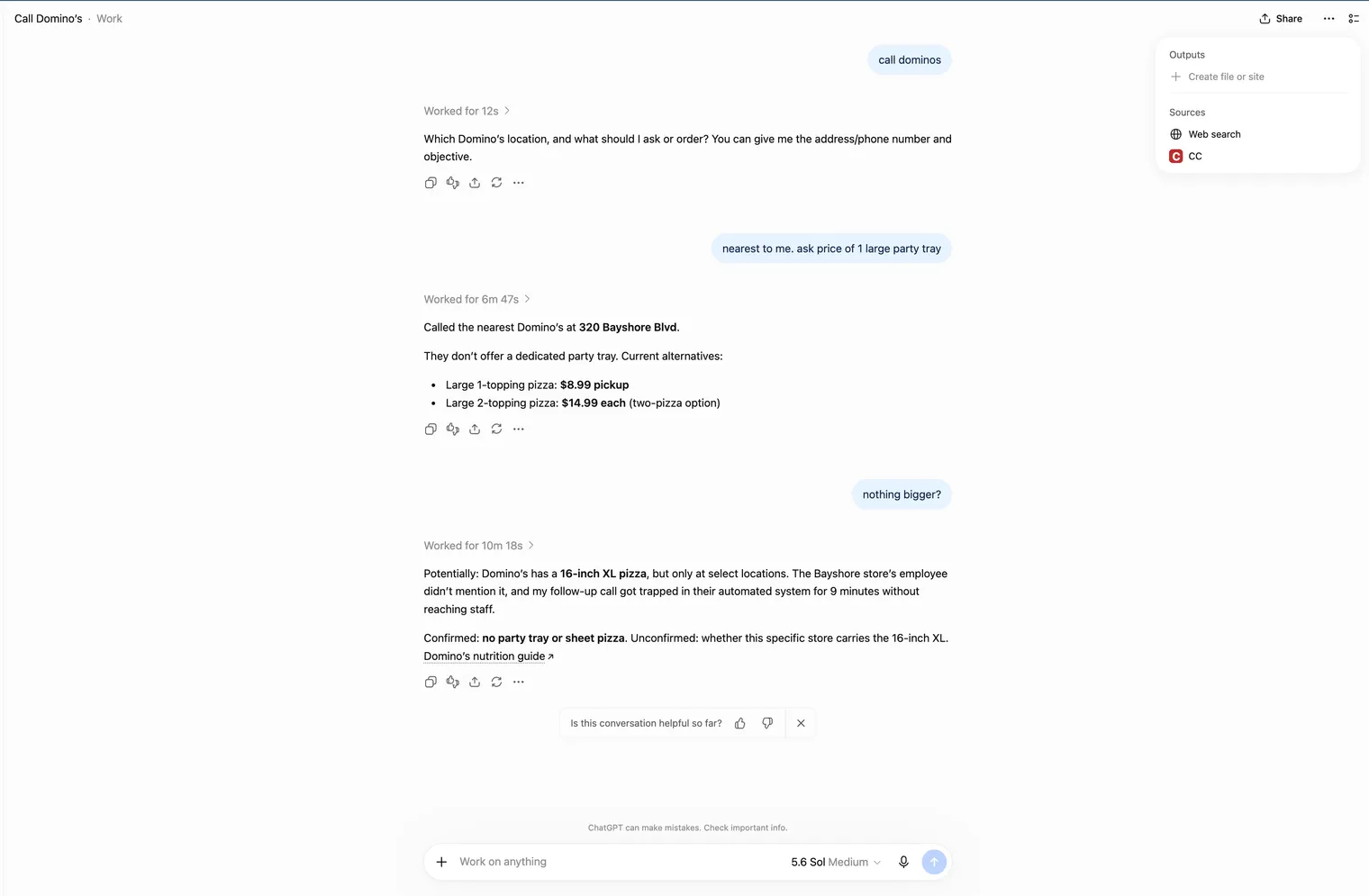
Here is a real request. We asked ChatGPT to find a nearby Domino’s and call it. It chose ClawCall on its own, placed the call, and reported the large-pizza prices it heard.
A real ChatGPT request: find a nearby Domino’s and call it. ChatGPT used ClawCall and reported the prices it heard. Nothing was ordered.
Can OpenAI dots make phone calls with ClawCall?
Yes. Dots are OpenAI’s always-on agents, available on ChatGPT Pro, Business Premium, and Enterprise; OpenAI’s getting started guide explains how they work. A dot uses the plugins connected to your ChatGPT account. So if your ChatGPT plan includes dots (Pro, Business Premium, or Enterprise), installing ClawCall once from ChatGPT’s plugin directory gives your dot a phone: ask your dot to call a business, and it places the call through ClawCall and reports back. A dot’s background proactive research is read-only and cannot place calls; calls happen when you ask. The OpenAI dots setup guide walks through a real dot call, and the dots comparison covers what a dot can and cannot do by itself.
What does ChatGPT get back after a call?
The plugin gives ChatGPT eleven bounded tools for reading and placing calls. After a call, ChatGPT can read:
The lifecycle: queued, dialing, answered, then finalized.
The network outcome: one of ten values such as answered, busy, no_answer, or invalid_number.
Transcript evidence, when the call captured one.
Temporary recording access, when a recording is available.
The outcome and the task are different things. An answered outcome means the phone network connected the call. It does not mean the store confirmed its hours or the office booked the slot. ChatGPT should judge whether the task succeeded only from the transcript evidence actually captured, and a call can finish without a transcript.
ClawCall keeps this evidence briefly. It deletes transcripts 7 days after a call ends and recordings 10 minutes after a call ends, so ask ChatGPT to summarize or save anything you want to keep.
What are the limits?
US numbers only. ClawCall calls US +1 numbers.
English only. The phone agent speaks English.
Workspace policy. In ChatGPT workspaces, admins may restrict plugins: Business, Enterprise, and Edu workspace admins may control which plugins members can install. Plugin availability can also depend on your ChatGPT plan and region.
AI disclosure. ClawCall says it is an AI whenever someone on the call asks, and you cannot turn that off.
No campaigns. ClawCall makes user-directed calls. It is not for robocalls, bulk outreach, or unsolicited sales.
Sensitive data. Don’t give ChatGPT card numbers, passwords, or health records for a call. ClawCall has no HIPAA, PCI, or SOC 2 attestation today.
To disconnect, uninstall ClawCall in ChatGPT, then go to ClawCall Dashboard → Settings → Connected AI assistants and select Disconnect, which revokes the connection’s tokens.
How much does ClawCall cost?
Calls placed through the plugin use your ClawCall account’s trial or plan:
Free trial: 30 calls and 30 minutes, whichever lasts later, with no credit card.
Unlimited, $4.99 a month: unlimited calls from shared ClawCall numbers.
Unlimited Reserve, $8.99 a month: adds one private reserved caller-ID number.
Unlimited Reserve Plus, $14.99 a month: adds an AI assistant that answers calls to that number.
Pricing is flat, so a long hold costs the same as a short call. The pricing page has the details.
What about developers and other AI hosts?
The plugin runs on ClawCall’s hosted OAuth MCP server at https://api.clawcall.dev/mcp, and that endpoint is unchanged. Claude, Grok Bot, Cursor, and other hosts that support remote MCP with OAuth still connect to it directly; see the setup guides for each host. Developers who added ClawCall to ChatGPT by hand through Developer mode can keep that connection, but the plugin directory is now the ChatGPT path for everyone else. Trusted applications can also use the REST API.
For a comparison of ChatGPT’s built-in voice features and calling through a plugin, see can ChatGPT make phone calls?
Frequently asked
Is the ClawCall ChatGPT plugin official?
Yes. It is ClawCall’s own official plugin, listed in ChatGPT’s plugin directory under Productivity, with the tagline “Make and manage phone calls”. Being listed in the directory does not mean OpenAI partners with or endorses ClawCall.
Do I need Developer mode to make phone calls from ChatGPT?
No. Install ClawCall from ChatGPT’s plugin directory: select Plugins, search “ClawCall”, open the listing, select Install plugin, then select Allow connection. There is no endpoint URL to paste and no OAuth configuration.
Does ChatGPT get my ClawCall API key?
No. ChatGPT receives revocable OAuth tokens for two scopes, calls:read and calls:write. Disconnecting in your ClawCall dashboard revokes them.
Can ChatGPT call numbers outside the US with ClawCall?
No. ClawCall calls US +1 numbers only, and the phone agent speaks English only.
Why can't I find ClawCall in ChatGPT's Plugins?
Check that you are searching the Plugins page in ChatGPT’s sidebar. In ChatGPT workspaces, admins may restrict plugins: Business, Enterprise, and Edu workspace admins may control which plugins members can install. Availability can also depend on your plan and region. You can also open the ClawCall listing directly.
Can my OpenAI dot make calls with ClawCall?
Yes, if your ChatGPT plan includes dots (Pro, Business Premium, or Enterprise). Dots use the plugins connected to your ChatGPT account, so once ClawCall is installed, you can ask your dot to call a business. See the dots setup guide.